

Customer Experience
Restaurant Guide: Use These 10 Tactics to Improve Your Google Review Strategy
Jun 28, 2024

TLDR
As a restaurant owner, you know that online reviews play a critical role in your business's success. With review sites like Google becoming the first stop for many diners, a positive presence is no longer optional - it's essential. This article will provide you with 10 proven tactics to improve your Google review strategy. You'll learn simple yet powerful ways to encourage more customers to leave feedback, respond appropriately to both positive and negative reviews, and leverage your ratings to attract new customers. With these actionable techniques in your toolbox, you'll be able to shape your online reputation and turn happy customers into five-star raves.
[
](https://apps.apple.com/us/app/chip-city/id6445899325)
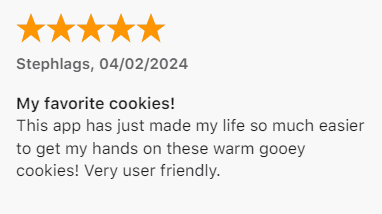
Chip City Cookies App's review
Ask Customers Directly to Leave Google Reviews
One of the most effective ways to increase your Google reviews is to simply ask customers directly. Though it may seem obvious, many businesses fail to proactively solicit feedback. Adopt a polite, professional approach when making these requests.
Identify Key Touchpoints
Determine the optimal times to request a review from each customer. This could be:
- After they pay their bill
- When sending a follow-up email or text
- As they are leaving the premises
- Right after they order through the app
The goal is to catch them when the experience is still fresh in their minds.
Make It Easy
Provide simple, clear instructions on how to leave a Google review. You can:
- Include a direct link or QR code to your business listing
- Offer step-by-step guidance for less tech-savvy customers
- Mention it can be done quickly on their mobile device
Reducing friction improves the likelihood they'll follow through.
Use Customized Messaging
Generic requests are easily ignored. Instead, personalize your ask by:
- Using the customer's name in emails or printed materials
- Mentioning specific details about their visit that you appreciated
- Thanking them for their business and loyal patronage
This extra effort shows you value their feedback as an individual.
While asking directly requires an upfront investment of time, it pays dividends. New Google reviews enhance your online reputation and can attract a steady stream of new customers over time.
Make Review Requests Convenient
Customers are far more likely to leave reviews when the process is easy and streamlined. Integrate review requests into your existing customer touchpoints to capture feedback at the ideal moments.
Prompt After Ordering
Solicit reviews right after customers place orders, while their experience is still fresh. The Per Diem mobile app enables restaurants to customize email templates with a call-to-action for leaving a Google review. Customers simply click the link to be taken directly to the review page.
Reservation Reminders
Many reservation systems offer integrations to automatically send review requests after a completed dining experience. Look for platforms that allow you to insert direct links to your Google listing. Make leaving feedback as frictionless as possible.
QR Code Prompts
Print QR codes on receipts or display them around your establishment. When scanned, these can open review sites or custom feedback pages. Offer small incentives like a discount on their next visit for completing a review.
The more convenient you make the process, the higher your review acquisition rates will be. Capture feedback at multiple touchpoints for maximum results. With an app like Per Diem, making review requests is simple and built directly into your operations.
Respond to All Google Reviews
Acknowledge Positive Feedback
Positive reviews are a great opportunity to build customer relationships and encourage others to visit your restaurant. Thank satisfied diners personally by responding to their review and addressing them by name. This small gesture shows you value their business and feedback.
Address Negative Feedback Professionally
Negative reviews happen, but how you respond matters. Stay calm and polite - avoid getting defensive or confrontational. Personalize your response by referencing specifics from their review. Apologize for any issues, take responsibility, and let them know you are working to improve. Offer to discuss further privately to resolve the situation.
Monitor and Respond Quickly
Set up notifications to be alerted when new Google reviews come in for your restaurant. Respond within a day or two while the experience is still fresh in the customer's mind. Prompt, thoughtful replies show you value customer feedback - both good and bad.
Highlight Positive Changes
Use your responses to highlight any positive changes or improvements you've made based on previous feedback. This demonstrates you are actively listening to customers and working to enhance their experience. It also gives unhappy reviewers reassurance that issues are being addressed.
Stay Consistent and Professional
Maintain a consistent, professional tone in all your review responses that aligns with your restaurant's brand voice and values. This unified approach builds trust and credibility with potential and existing customers reading the reviews.
Read the blog to learn more proven strategies to win customer reviews on Yelp too.
Final Thoughts
You have reached the end of this guide on improving your Google review strategy for your restaurant. By implementing the tactics outlined, you now have actionable steps to start collecting more customer feedback and managing your online reputation. Don't wait - get started today. The faster you implement a review generation strategy, the sooner you will reap the rewards of higher visibility and increased revenue. Keep striving for improvement. With some persistence and creativity, you can make your restaurant a success story.